You spend an hour polishing your CV, hit apply, and hear nothing. Not even an automated rejection. Just silence.
More often than not, this isn't about your qualifications. It's about a piece of software that never gave your CV a fair read. Over 75% of applications sent to large employers are filtered out automatically by Applicant Tracking Systems before a human ever opens them.
This guide covers exactly how ATS works, what formatting breaks the parser, how to match your keywords correctly, and how to verify your CV is actually readable before you send it.
75%
of CVs are rejected by ATS software before reaching a recruiter (source: Jobscan, 2025)
What Is ATS and How Does It Read Your CV?
ATS (Applicant Tracking System) is recruitment management software used by large employers, recruitment agencies, and job boards to automate the first stage of candidate screening. Major UK employers - including NHS Trusts, public sector bodies, banks, and most FTSE 250 companies - use some form of ATS.
The system doesn't read your CV the way a person does. It runs a sequence of precise operations:
- Parsing - the system extracts raw text from your file and attempts to assign it to structured fields: name, contact details, employers, job titles, dates, skills, qualifications.
- Indexing - the parsed data enters a searchable candidate database that recruiters can query.
- Scoring - your CV is compared against the requirements of the specific vacancy and assigned a match score, often expressed as a percentage.
- Ranking - candidates are sorted by score. The recruiter sees the highest-ranking CVs first.
The practical consequence: if the job description says "stakeholder management at board level" and your CV says "worked with senior leadership," the ATS may score that as a mismatch. The algorithm compares text literally - it doesn't infer meaning or resolve synonyms.
Common ATS platforms used by UK employers include Workday, Taleo, Greenhouse, Lever, and SmartRecruiters. Reed and Totaljobs use their own matching algorithms. Each system behaves slightly differently, but the optimisation principles are consistent across all of them.
Why Complex Graphics and Tables Destroy Your Chances
This is one of the most common - and most damaging - mistakes candidates make. You invest time in a visually impressive CV: two columns, icons beside each section, a decorative header bar, skill-level bars showing five stars out of five. It looks polished to a human reviewer.
An ATS parser reads text linearly, from the top-left to the bottom-right of the page. When it encounters a two-column table, things break down. Instead of:
Experience: Marketing Manager, Acme Ltd, 2022-2024
Skills: Google Ads, SEO, Copywriting
The parser may output:
Experience: Skills: Marketing Manager Google Ads Acme Ltd SEO 2022-2024 Copywriting
Or skip one column entirely.
Elements that regularly break ATS parsing:
- Tables - especially multi-column layouts with content in table cells
- Text boxes - parsers ignore them completely; any content placed inside is invisible to the system
- Section headers as images - if "Work Experience" is a graphic rather than text, that section doesn't exist for the algorithm
- Icons and symbols replacing text - a phone icon instead of the word "Phone:", star ratings for skills instead of written skill levels
- Headers and footers in Word documents - older ATS systems frequently skip content placed in the header/footer area, including contact details
- Uncommon embedded fonts - if the font isn't installed on the parsing server, the system may render it as an image
The rule to remember: if you can highlight and copy the text with your cursor, the parser can read it too. If you can't - there's a problem.
43%
of candidates use CV templates with tables or multi-column layouts, reducing their ATS score (Resume Worded, 2024)
How to Match Keywords From a Job Description
This is the core of ATS optimisation. A perfectly formatted CV with the wrong keywords will still score poorly. Getting the keywords right is what actually moves you up the ranking.
Step 1: Read the job description carefully and mark repeated phrases
Most job descriptions repeat their most important requirements two or three times - in the job title, in the responsibilities section, and in the requirements section. What repeats is what the scoring algorithm weights most heavily.
Step 2: Identify three categories of keywords
- Hard skills and tools - specific software, platforms, methodologies, and qualifications. Examples: "Salesforce CRM", "Google Analytics 4", "Python", "PRINCE2 Practitioner".
- Soft skills in context - not "communication skills" in isolation, but the specific framing from the job description: "stakeholder engagement at director level," "cross-functional team leadership".
- Role title and sector terminology - the exact job title used in the posting. If it says "Senior Business Analyst," use that phrase precisely, not "BA" or "business analyst."
Step 3: Weave keywords into your content naturally
Don't create a block of keywords at the bottom of your CV - that's unreadable for humans and flagged as suspicious by more sophisticated ATS systems. Incorporate them into your experience descriptions and professional summary.
Compare:
Weak: "Managed projects and worked with various tools across different teams."
Strong: "Managed a portfolio of eight digital transformation projects using Agile/Scrum methodology in Jira, coordinating cross-functional teams of up to 12 and reporting progress directly to the CTO."
The second version contains specific keywords exactly as they'd appear in a job description - and it reads naturally.
Step 4: Watch out for British English vs. American English
UK job descriptions will say "optimise" not "optimize," "programme" not "program," "colour" not "color." If you've used US spellings throughout your CV - especially in role descriptions or tool names - this can affect matching on UK-specific ATS deployments. Consistent British English is the safer default for UK applications.
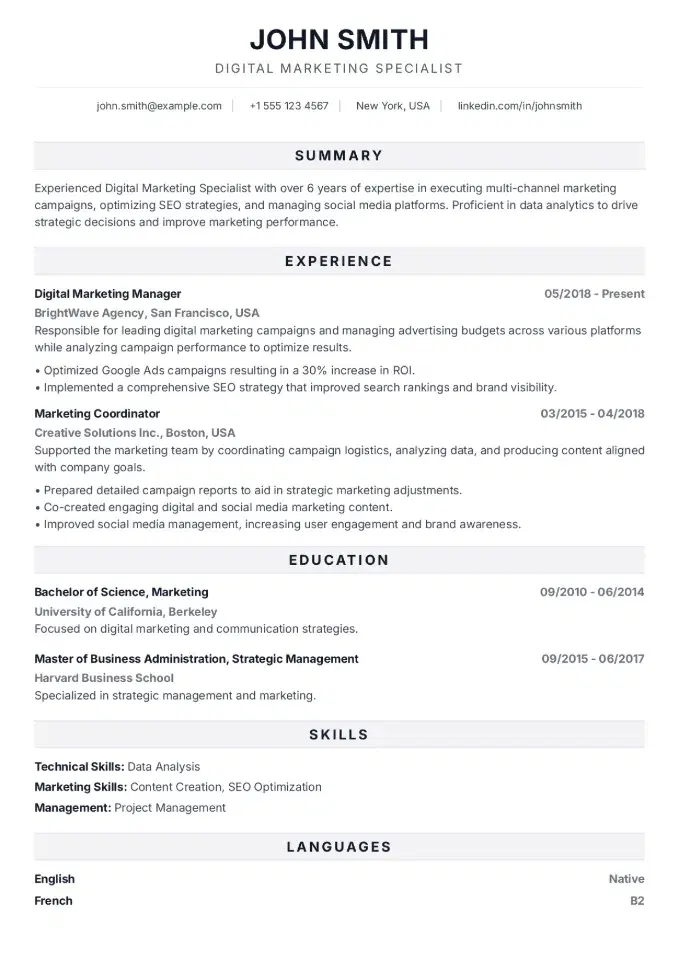
Like this layout?
Try the Bold Pro template - Click to fill it with your data
Bold ProCV Fonts and Layout That Parsers Can Handle
One principle covers everything here: simplicity beats design when the audience is software.
ATS-safe fonts:
Stick to fonts with well-supported character sets that are pre-installed on most systems. The safest options are Calibri, Arial, Helvetica, Georgia, and Times New Roman. Body text: 10-12pt. Section headings: 13-14pt, bold.
Avoid: decorative fonts downloaded from font sites, condensed or ultra-light weights that may not be embedded correctly in the PDF, and any font that isn't part of the standard Microsoft Office or Google Workspace library.
Single-column or simple half-column layout:
A single column is the safest and most universally compatible format. If you want a layout with a narrow sidebar (contact details and skills on the left, experience on the right), make sure the template achieves this through CSS in the PDF export rather than with tables or text boxes. A well-built template handles this transparently - you don't need to think about it.
File format:
- PDF with selectable text - preferred by most UK employers and safe for the vast majority of ATS systems. Verify by opening the file and attempting to highlight text.
- DOCX - required by some older ATS deployments and explicitly requested by some employers. If the application says "Word format only," send DOCX.
- Never send: JPG, PNG, a scanned PDF, or a Pages file (Mac-only format that won't open correctly on Windows).
Standard section headings - not creative alternatives:
| Instead of this | Use this |
|---|---|
| "My Career Journey" | Work Experience |
| "What I Bring" | Skills |
| "Where I Studied" | Education |
| "About Me" | Professional Summary |
ATS systems are trained to recognise standard labels. Non-standard headings can cause content to be assigned to the wrong field - or not classified at all.
Test Your CV Before You Apply
Optimising without verification is guesswork. Before sending any application, run two checks.
Manual test: copy and paste
Copy the entire content of your CV and paste it into Notepad (Windows) or TextEdit in plain text mode (Mac). If:
- the text flows in logical order - your layout is parser-safe
- sections or lines are missing - you have text boxes or images containing text
- the order is garbled - you have a table with multiple columns
ATS Score in CVCompose
CVCompose includes a built-in ATS Score feature that automates this analysis. Paste the job description, and the tool:
- compares keywords in your CV against the requirements in the posting and identifies what's missing
- checks your formatting for elements that are known to break parsers
- calculates a percentage match score
- suggests specific changes - not generic advice, but the exact missing phrases and sections
Before each application, you'll know whether your CV has a real chance of clearing the filter - and precisely what to fix before clicking send. When you're applying to multiple roles, that saves significant time.
2.7x
higher interview callback rate for CVs scoring above 80% on ATS Score (CVCompose internal data, 2025)
Five things to check before every application:
- Does your professional summary include the exact job title from the posting?
- Are key tools and technologies named word-for-word as they appear in the job description?
- Can you highlight and copy all text from the PDF?
- Are your section headings standard labels, not creative alternatives?
- Is the file under 2MB? (Larger files are rejected by some ATS systems before parsing even begins.)
FAQ
What is an ATS and how does it work in recruitment?
ATS (Applicant Tracking System) is software used by employers to automatically screen CVs. It extracts text from your file, maps it to structured fields, and scores your CV against the vacancy requirements. A CV missing the right keywords or with broken formatting is filtered out before any human sees it.
How do I know if my CV will pass an ATS?
The quickest test: paste your CV text into a plain text editor. If it looks garbled or content is missing, a parser will have the same problem. For a full analysis, CVCompose's ATS Score feature compares your CV against a specific job description and shows you exactly what needs to change.
What keywords should I put in my CV for ATS?
Take keywords directly from the job description - especially phrases that appear more than once and terms from the requirements and responsibilities sections. Use the exact wording from the posting: ATS systems match text literally and don't interpret paraphrases.
Is PDF a safe format for ATS?
Yes, as long as the PDF contains selectable text rather than a scan or image. Open the file and try to highlight text with your cursor - if it works, the parser can read it. CVCompose exports ATS-safe PDFs by default.
Why do tables and multi-column layouts hurt ATS scores?
ATS parsers read text linearly. A table disrupts that order - left and right column content can be jumbled or skipped. The same applies to text boxes, graphical section headers, and icons used in place of text.
Does every UK employer use ATS?
Not every employer, but most large organisations in the UK do, as well as major job boards. Smaller firms and direct email applications may bypass automated screening entirely - but a clean, well-formatted CV never hurts regardless.