Searching for a job is stressful. You spend hours polishing every sentence, hit send, and then - silence. No response, no rejection, nothing.
Here's what most people don't realise: your CV probably never reached a human. Over 75% of large companies use software called an Applicant Tracking System (ATS) to filter applications before a recruiter ever opens them. If your CV doesn't pass that filter, it doesn't matter how qualified you are.
This guide walks you through writing a CV that works in 2026 - one that gets past the software and impresses the person who reads it.
75%
of CVs are rejected by ATS before a human ever reads them (source: Jobscan, 2025)
Why Your CV Must Be Readable by AI in 2026
Ten years ago, a recruiter would scan every CV by hand. Today, most companies - especially those receiving hundreds of applications - rely on ATS to do the first pass.
Here's what that means for you:
- Keywords matter. The ATS scans your CV for specific terms from the job posting. If they're not there, you're out.
- Format matters. Fancy graphics, tables, and multi-column layouts can confuse the parser. Your carefully designed CV might arrive as garbled text.
- Structure matters. Standard section headings like "Work Experience" and "Education" help the software categorise your information correctly.
This doesn't mean your CV has to look boring. It means the underlying structure needs to be clean. A well-built template handles this for you - you focus on the content.
An ATS doesn't "read" your CV the way a person does. It extracts text, maps it to fields (name, job title, skills, dates), and scores it against the job description. The closer the match, the higher your ranking. Three things will get you filtered out immediately:
- Missing keywords from the job posting
- Non-standard section names (e.g. "My Journey" instead of "Work Experience")
- Information baked into images that the parser can't extract
Start With Your Professional Summary
The professional summary sits at the top of your CV, right below your contact details. It's the first thing both the ATS and the recruiter see. Think of it as your elevator pitch - 3 to 4 sentences that answer: Why should we keep reading?
A good summary does three things: states your role and seniority clearly, highlights one concrete result with a number, and connects to what this specific employer needs. Here's what that looks like:
Marketing Manager with 6 years of experience in B2B communications and brand growth. Led a team of 4 that increased qualified enquiries by 140% in 18 months through content strategy and paid campaigns. Looking to bring a structured, results-driven approach to a company with ambitious growth targets.
Notice what's not there: no "hard-working team player," no generic adjectives. Every word carries information.
What to avoid: phrases like "I am a passionate professional" say nothing - everyone claims to be passionate. Don't list 10 skills in a row (that belongs in the Skills section), and don't be vague - "Experienced in various industries" tells the reader nothing about you.
If you're not sure where to start, try this formula:
[Role] with [X years] of experience in [domain]. [Key achievement with a number]. [What you're looking for].
How to Describe Your Work Experience
This is where most CVs fall flat. People list their responsibilities instead of showing what they actually achieved. Recruiters don't want to know what you were supposed to do - they want to know what happened because you were there.
Every bullet point should follow this pattern: [Action verb] + [what you did] + [measurable result]. Compare these two:
- Weak: "Responsible for managing social media accounts"
- Strong: "Grew Instagram following from 2K to 18K in 12 months, generating 35% of inbound leads"
The second version tells a story. It shows initiative, scale, and impact.
2x
CVs with quantified achievements are twice as likely to get an interview callback (TopResume study)
For each role, include: job title (the actual one, not inflated), company name and location, a date range in month-and-year format (e.g. "Mar 2022 - Present"), and 3-5 achievement-based bullet points.
Tailoring to each job is the step most people skip, and it's the most important one. Before sending each application: read the posting carefully, identify 5-8 key requirements, and make sure your bullet points address at least 3-4 of them. Mirror their language - if they say "stakeholder management," use that phrase, not "working with people." This isn't about lying. It's about surfacing the parts of your real experience that are most relevant to this specific role.
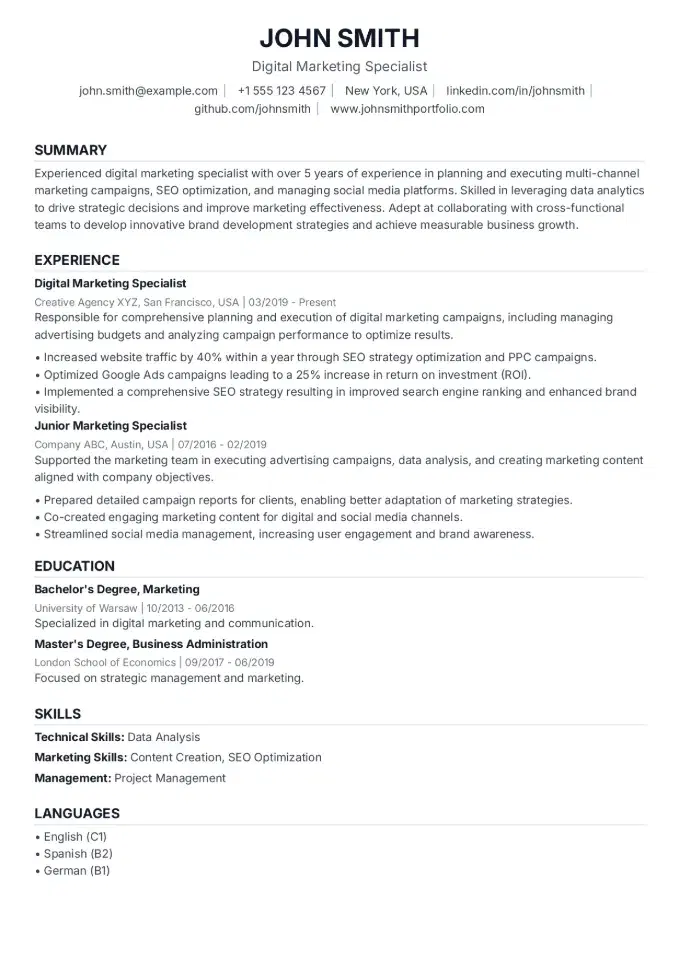
Like this layout?
Try the Essential Clean template - Click to fill it with your data
Essential CleanHow to Present Education and Courses
Education matters, but how much space it deserves depends on your career stage.
Less than 3 years of experience? Put education near the top. Include degree name and field of study, university name, graduation year, and any relevant coursework or academic achievements worth noting.
5+ years of experience? Education moves to the bottom. Degree, university, year - that's it. Skip the coursework and grades; your work history speaks louder.
Certifications carry real weight in 2026, regardless of sector. Credentials from recognised bodies are always worth listing - project management (PMP, PRINCE2), finance (ACCA, CFA), HR (CIPD), or whichever qualification is standard in your industry. Google Analytics or social media certifications make sense for marketing roles. A one-off online course with no exam or formal assessment probably isn't worth the space. List certifications with the issuing organisation and year.
Common CV Mistakes That Get You Rejected
These errors seem small, but any one of them can cost you the interview.
1. One generic CV for every application
If you're sending the same CV to 50 different roles, you're probably getting filtered out of most of them. Each application needs at least light tailoring - adjust your summary, reorder your bullet points, match keywords.
2. No numbers anywhere
"Improved team performance" means nothing without context. How much did you improve it? How many people were on the team? Recruiters are trained to look for numbers. If your CV has none, it feels vague and forgettable.
3. Walls of text
Long paragraphs are hard to scan. Use bullet points. Keep them to one or two lines maximum. White space is your friend.
4. Outdated or irrelevant experience
Your summer job from 2014 doesn't need to be on your 2026 CV. Focus on the last 10-15 years. If an older role is genuinely relevant, keep it brief - one line is enough.
5. Spelling and grammar errors
It sounds obvious, but typos still kill applications. They signal carelessness. Run your CV through a spell checker, then ask someone else to read it.
6. Missing contact details
It happens more often than you'd think. Make sure your email, phone number, and LinkedIn are clearly visible at the top. Skip your full home address - city and country are enough.
7.4 sec
average time a recruiter spends on the first scan of your CV (Ladders eye-tracking study)
Putting It All Together
Here's a quick checklist before you hit send:
- Professional summary tailored to this role (3-4 sentences)
- Work experience with achievement-based bullet points and numbers
- Keywords from the job posting naturally incorporated
- Education section appropriate to your career stage
- Clean, ATS-friendly formatting - no graphics in section headers
- Contact details clearly visible at the top
- PDF format (unless the posting asks for something else)
- Proofread by another person
If you want to skip the formatting headaches entirely, CVCompose lets you build a professional, ATS-tested CV for free - no sign up required. Pick a template, fill in your data, and download a PDF that's ready to send. The templates are designed to look great and parse correctly - so you don't have to choose between design and compatibility.
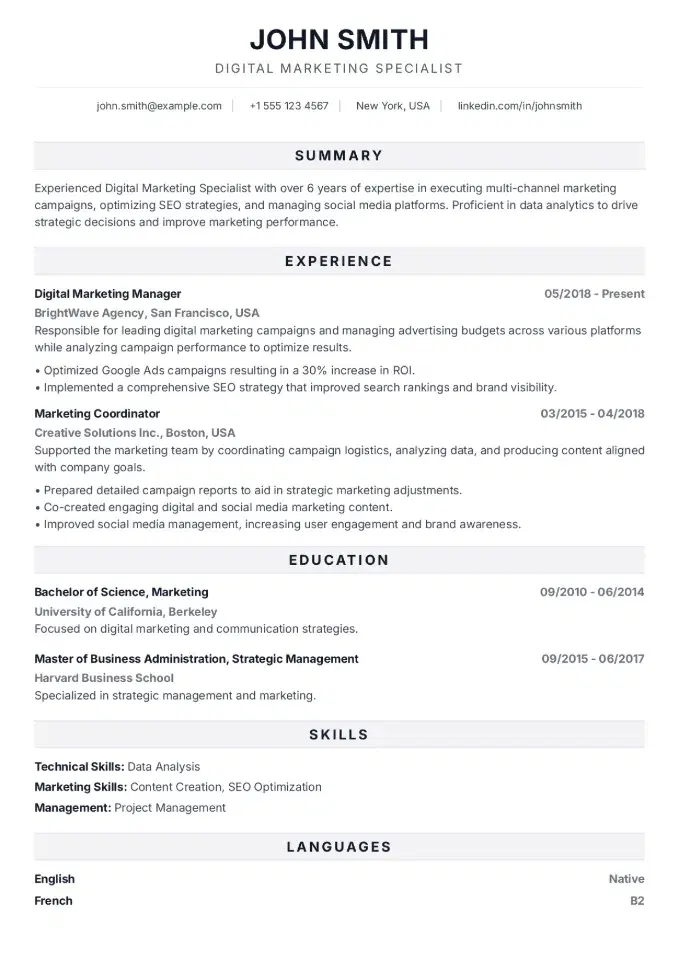
Like this layout?
Try the Bold Pro template - Click to fill it with your data
Bold Pro