You tailor your resume, submit through the company portal, and wait. No callback. Not even a form rejection. Just nothing.
In most cases, this isn't a qualifications problem. It's a software problem. 98% of Fortune 500 companies use Applicant Tracking Systems to screen resumes automatically before a recruiter ever opens the file. If your resume doesn't clear that filter, it doesn't matter how good you are.
This guide breaks down how ATS actually works, what formatting issues are costing you interviews, how to match keywords from any job description, and how to validate your resume before you hit submit.
98%
of Fortune 500 companies use ATS to screen resumes before human review (source: Jobscan, 2025)
What Is ATS and How Does It Read Your Resume?
ATS (Applicant Tracking System) is software that manages the hiring pipeline - from the moment you apply to the moment a recruiter picks up the phone. Every major employer in the US uses one. Workday, Taleo, iCIMS, Greenhouse, Lever, and SmartRecruiters are the platforms you're most likely encountering when you apply through Indeed, LinkedIn, or a company's careers page.
When you upload your resume, here's the sequence the system runs:
- Parsing - the system pulls raw text from your file and maps it to structured data fields: name, contact info, employers, job titles, employment dates, skills, degrees.
- Indexing - your parsed data enters a searchable candidate database the recruiter can query.
- Scoring - your resume is compared against the requirements of the specific job and assigned a match score, often shown as a percentage.
- Ranking - candidates are sorted by score. The recruiter reviews the top of the list first. If you're not in the top tier, you may never get a look.
What this means in practice: if the job posting says "experience with Salesforce CRM" and your resume says "worked with customer relationship management tools," the ATS may score that as a miss. The algorithm doesn't interpret meaning - it matches text. Salesforce ≠ CRM tools in the eyes of a parser.
This is why the same resume sent to 50 jobs without customization gets almost no responses. The content is fine. The keyword alignment is broken.
Why Complex Formatting and Graphics Kill Your ATS Score
This is where a lot of candidates sink themselves without realizing it. You download a visually impressive template - two columns, icons next to each section, a professional header with a color bar, star ratings for your skills. It looks great in preview.
An ATS parser reads text in a single linear pass, left to right, top to bottom. A two-column table breaks that flow immediately. Instead of reading:
Work Experience: Senior Account Executive, Acme Corp, 2021-2024
Skills: Salesforce, HubSpot, Outreach
The parser might output:
Work Experience: Skills: Senior Account Executive Salesforce Acme Corp HubSpot 2021-2024 Outreach
Or silently drop one column entirely.
Formatting elements that reliably break ATS parsing:
- Tables - any multi-column layout that uses actual HTML or Word table structures
- Text boxes - content inside text boxes is typically invisible to the parser; it simply doesn't exist in the extracted output
- Graphical section headers - if "Work Experience" is an image rather than text, the entire section may be unclassified
- Icons and symbols replacing text - a LinkedIn icon instead of the URL, a star rating system instead of written skill levels
- Headers and footers in Word files - contact details placed in the document header area are frequently skipped by older ATS systems
- Non-standard fonts - fonts that aren't part of standard system libraries may fail to render and get converted to images
The practical rule: if you can select the text with your cursor and copy it, the parser can read it. If you can't - it can't.
43%
of candidates use resume templates with tables or multi-column layouts, lowering their ATS score (Resume Worded, 2024)
How to Pull the Right Keywords From Any Job Description
Formatting is necessary but not sufficient. A perfectly structured resume with the wrong keywords will still rank low. Keyword matching is where your score is made or lost.
Step 1: Read the job description and highlight repeated phrases
Most job descriptions repeat their core requirements two or three times - in the title, in the responsibilities section, and in the qualifications section. What repeats is what the algorithm weights most heavily. If "cross-functional collaboration" appears twice, it's a priority keyword.
Step 2: Sort keywords into three buckets
- Hard skills and tools - specific software, platforms, languages, and certifications. Examples: "Salesforce CRM," "Python," "Google Analytics 4," "PMP," "AWS Certified Solutions Architect."
- Role-specific phrases - exact wording used for the job function. If the posting says "demand generation," that's more specific than "marketing." Use their language.
- Soft skills in context - not "leadership" or "communication" on their own, but phrased as the posting frames them: "executive-level stakeholder management," "leading distributed teams across time zones."
Step 3: Embed keywords naturally into your experience descriptions
Don't paste a keyword block at the bottom of your resume. That's unreadable and some modern ATS systems flag it as keyword stuffing. Work them into your bullet points and summary.
Compare:
Weak: "Managed marketing campaigns and used various tools to improve performance."
Strong: "Led demand generation campaigns in HubSpot and Salesforce, reducing cost-per-lead by 34% while growing qualified pipeline by $1.8M over two quarters."
The second version contains specific keywords that mirror what a job description would say - and it tells a real story with a number attached to it.
Step 4: Match the exact phrasing, including capitalization and abbreviations
"Project Management Professional" and "PMP" are both worth including if the job description uses both. "Javascript" and "JavaScript" can score differently depending on the parser. When in doubt, use the exact string from the job description, then add the alternate form in parentheses on first use.
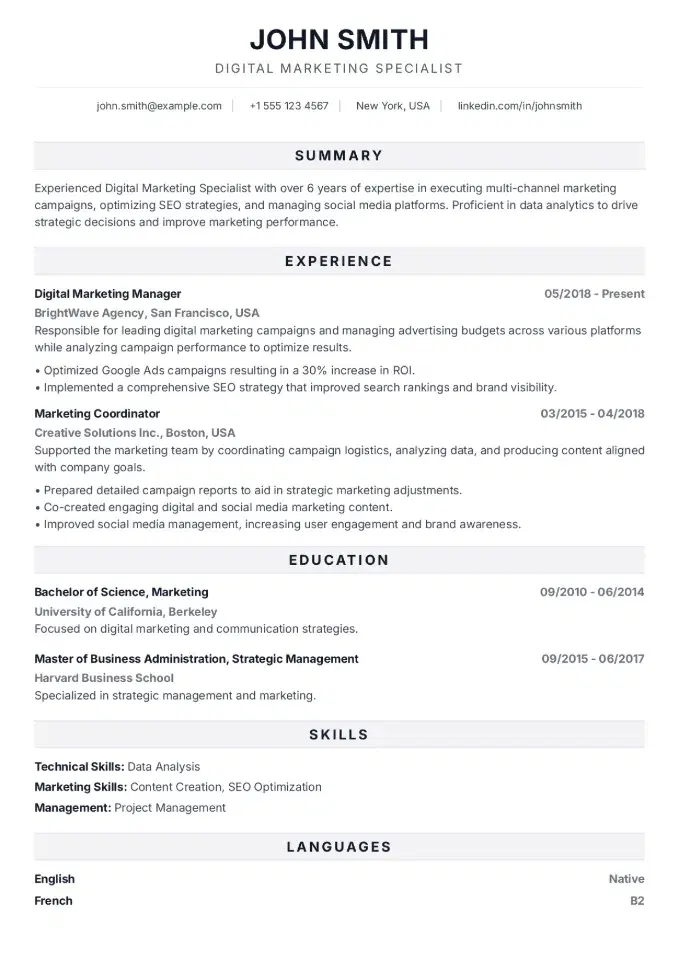
Like this layout?
Try the Bold Pro template - Click to fill it with your data
Bold ProResume Fonts and Layout That Parsers Can Actually Read
Everything here reduces to one principle: for ATS, clean wins over clever.
ATS-safe fonts:
Use fonts that are pre-installed on virtually every system and have full character support. The safest choices: Calibri, Arial, Helvetica, Georgia, and Times New Roman. Body text: 10-12pt. Section headings: 13-14pt, bold.
Avoid decorative fonts from third-party sites, ultra-light or condensed weights that may not embed correctly, and any font not in the default Microsoft Office or Google Workspace library.
Layout: single column is the safest format
One column, top to bottom, is universally parser-safe. If you want a sidebar layout - common in modern resume templates - make sure the template achieves this using CSS-based columns in the PDF export, not actual tables or text boxes. A well-built template handles this invisibly. When in doubt, single column.
File format:
- PDF with selectable text - the default recommendation for most US applications. Verify by highlighting text in the file before submitting.
- DOCX - required by some ATS systems, especially Taleo. Some job postings explicitly request Word format - always comply.
- Never submit: a JPG or PNG of your resume, a scanned PDF, a Pages file, or anything that can't be opened natively on a Windows PC.
Standard section headings - not original ones:
| Don't use | Use this |
|---|---|
| "My Story" | Work Experience |
| "What I'm Good At" | Skills |
| "Where I've Been" | Education |
| "The Quick Version" | Summary |
ATS systems are trained on standard labels. A creative heading can cause your content to be miscategorized - or not parsed at all.
Test Your Resume Before Every Application
Don't send cold. Run these two checks first.
Manual test: the paste test
Copy your entire resume and paste it into Notepad (Windows) or TextEdit in plain text mode (Mac). Check three things:
- Is the text in logical order? If yes, your layout is parser-safe.
- Are sections or lines missing? If yes, you have text boxes or image-based text.
- Is the order scrambled? If yes, you have a table-based layout that's breaking the flow.
ATS Score in CVCompose
CVCompose has a built-in ATS Score tool that automates what the manual test can't catch. Paste in the job description you're applying to, and the tool:
- identifies keywords from the posting that are missing from your resume
- flags specific formatting elements that are known to break parsers
- calculates your percentage match score for that specific job
- gives you actionable fixes - not generic tips, but the exact phrases and sections to add or adjust
The result: before every application, you know your actual match score and what to change to increase it. Across dozens of applications, that's the difference between a 3% callback rate and a 20% one.
2.7x
higher interview callback rate for resumes scoring 80%+ on ATS Score (CVCompose internal data, 2025)
Five things to verify before every submission:
- Does your summary include the exact job title from the posting?
- Are your key tools and technologies named exactly as they appear in the job description?
- Can you highlight and copy all text in the PDF?
- Are your section headings standard labels (Work Experience, Skills, Education)?
- Is the file under 2MB? Some ATS systems reject larger files before parsing begins.
FAQ
What is ATS and how does it screen resumes?
ATS (Applicant Tracking System) is software that automatically processes resumes before a recruiter reviews them. It extracts text, assigns it to structured fields, and scores your resume against the job requirements. A resume missing the right keywords or with broken formatting gets filtered out automatically.
How do I know if my resume will pass ATS?
Paste your resume text into a plain text editor. If it looks scrambled or incomplete, a parser will have the same issue. For a detailed breakdown, CVCompose's ATS Score feature compares your resume against a specific job description and shows exactly what's missing.
What keywords should I use on my resume for ATS?
Take keywords directly from the job description - especially phrases that appear more than once and terms from the Requirements and Responsibilities sections. Use the exact wording: ATS systems match text literally and don't interpret synonyms.
Should I submit a resume as PDF or Word for ATS?
If the employer specifies a format, use it. Otherwise, a PDF with selectable text is the safest default. Always verify by opening the file and trying to highlight text. Never submit a scanned image or a Pages file.
Why do tables and columns break ATS parsing?
Parsers read text linearly. A table disrupts the reading order - left and right column content gets mixed together or dropped. Text boxes, graphical headers, and icons replacing text cause the same problem.
Does every company use ATS?
98% of Fortune 500 companies do, and most large employers in the US use some form of automated screening. Smaller companies and startups may bypass ATS entirely for direct applications. But a clean, ATS-optimized resume is never a disadvantage.